Why Your iPhone Won't Auto-Reply to Unknown Missed Calls (And How to Fix It)
Wondering why your iPhone won't automatically text back unknown missed calls? Learn about iOS security limitations and how third-party platforms like Conversify help businesses recover lost leads instantly.
No, there is no native iPhone app that automatically texts back missed calls from numbers not in your contacts due to Apple's strict security sandboxing [13]. While Apple's native iOS 15 or newer operating system offers workarounds like "Driving Focus" or "Respond with Text," these either require manual tapping or only send auto-replies to saved contacts [1, 2, 4]. They fail to automatically text brand-new customers calling from unknown numbers [3]. To solve this, the team behind Conversify developed tools that integrate with external VoIP platforms [8]. >
Key Takeaways
- No Native Automation: iPhones running iOS 15 or newer do not support fully automated text-backs for unknown missed calls due to strict app sandboxing [1, 13].
- Focus Mode Limits: Apple's "Driving Focus" only auto-replies to incoming text messages and is restricted to saved contacts, completely ignoring unknown numbers [2, 3].
- Manual Workarounds Exist: Features like "Respond with Text" and text replacement shortcuts require manual interaction and cannot run hands-free [1, 4].
Why Doesn't the iPhone Natively Auto-Reply to Unknown Missed Calls?
For many business owners, particularly those running local services like healthcare practices, clinics, or tattoo shops, switching from Android to iOS comes with a surprising realization. The iPhone does not feature a built-in, fully automated "missed-call text back" system that triggers on its own for all incoming calls [1]. Instead, Apple's native settings only offer passive workarounds that require manual input or are restricted to saved contacts [1]. This limitation is rooted in Apple's core philosophy of user privacy and operating system security. Apple employs strict "sandboxing" protocols, which isolate apps from one another and from the core phone system [13]. Because of this sandboxing, third-party iOS apps available on the App Store, such as AutoSender, cannot directly access the native iOS phone app to trigger an automatic text back for carrier-based missed calls without utilizing a virtual phone number [13]. Without a virtual number running on an external network, an app simply cannot "see" that you missed a carrier call, let alone send an automated SMS on your behalf. This security boundary protects personal users from spam and unauthorized data access, but it presents a significant hurdle for businesses trying to capture every incoming lead. To understand why Apple implements these restrictions, we must look at the architecture of iOS. Apple's operating system is designed to prioritize user privacy and prevent malicious apps from intercepting private communications. Under Apple's strict sandboxing guidelines, every app runs in its own isolated environment [13]. An app downloaded from the App Store cannot monitor your carrier's cellular call logs, detect when a call goes unanswered, or send an outbound SMS through your personal carrier plan without your explicit, real-time manual consent [13]. This security model is highly effective at stopping spam, but it creates a massive roadblock for local service providers who rely on immediate client communication. 
The Limits of iOS Built-In Workarounds
If you explore your iPhone's settings, you will find a couple of features that look like they might help, but they all fall short of true, hands-free automation for new clients.
The Driving Focus Limitation The native
"Driving Focus" mode is currently the only iOS Focus mode that supports sending an auto-reply text message [2]. While users can customize this message, it is designed to reply to incoming text messages rather than missed phone calls [2]. More importantly, Apple's "Driving Focus" auto-reply feature restricts its recipient list to "No One," "Recents," "Favorites," or "All Contacts" [3]. This means a brand-new customer calling from an unknown number not saved in the iPhone's address book will never receive the automated text [3]. For a growing business, this restriction is a major obstacle, as the most valuable missed calls are almost always from new, unknown prospects.
The "Respond with Text" Feature Another
option is the "Respond with Text" feature on iOS, which allows users to customize up to three preset messages under Settings, then Apps, then Phone [4]. Although useful, this is not automatic and requires the user to actively see the incoming call and tap the "Message" button on the ringing screen to decline and send the text [4]. If you are in the middle of treating a patient, tattooing a client, or driving, you cannot look at your phone to tap a button. If the call goes to voicemail naturally, "Respond with Text" will not trigger.
Text Replacement Shortcuts Setting
up a manual text replacement shortcut, such as typing "!missed" to expand into a full business reply, is a popular manual workaround for iPhone users [10]. This allows solo operators to quickly send a templated message to an unknown missed call from their Recents list with just a few taps [10]. While this saves time, it still requires you to manually open your call log, copy the number, open a new message thread, and type the shortcut. It is far from hands-free.
How the iOS Shortcuts App and iOS 26
Missed Call Reminders Fall Short Many tech-savvy users attempt to use the built-in iOS Shortcuts app to build a custom automation. Unfortunately, the iOS Shortcuts app lacks a native "missed call" trigger or direct access to the system call log to automate text replies [5]. While users can build custom automations for incoming text messages, they cannot configure a Shortcut to automatically text back an unknown missed call [5]. Apple's iOS 26 update introduces a "callback reminder" feature that integrates the Phone app with the Reminders app [6]. This feature allows users to swipe left on a missed call in their Recents list to set a reminder to call back, but it does not send any automated text communication to the caller [6]. It is purely an internal organizational tool, leaving the caller waiting in silence. 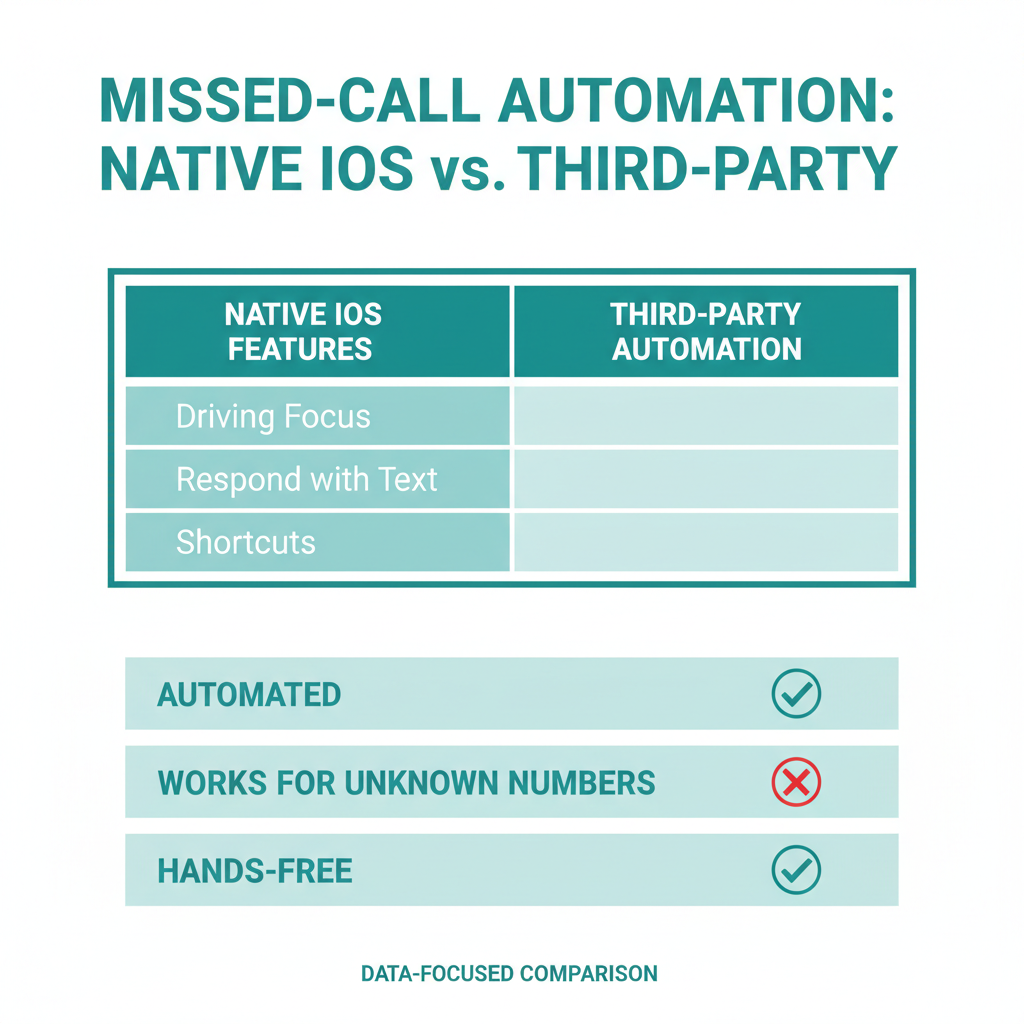
Why Missed-Call Text Back Recovery is
Critical for Service Businesses In the service industry, speed to lead is everything. Industry research shows that the majority of callers who reach a business's voicemail do not leave a message and will not call back [7]. Instead, they simply hang up and call the next competitor on their search results page. This behavior makes immediate missed-call text back recovery crucial for service businesses to prevent potential leads from contacting a competitor [7]. A prompt text message acknowledges the customer, starts a conversation, and keeps them from looking elsewhere. If you want to learn more about optimizing your customer communication strategies, check out our related articles. In the modern on-demand economy, prospective clients expect immediate gratification. When a homeowner searches for a local clinic or a tattoo artist, they typically call the top three search results. If the first business fails to answer and the call goes to voicemail, the customer rarely leaves a message; instead, they immediately hang up and dial the next competitor [7]. By automating an instant text response, you capture the prospect's attention while they are still highly motivated, effectively halting their search and securing their business before they contact anyone else.
How to Set Up True Missed-Call Text
Back Automation To achieve true, hands-free missed-call text back automation, third-party VoIP and business communication platforms, such as Quo (formerly OpenPhone) or Signpost, are required [8]. These platforms detect unanswered inbound calls at the network level and instantly trigger pre-written SMS workflows to any caller, regardless of whether they are in the user's contacts [8]. Additionally, dedicated lead-response tools like Signpost's Instant Response can automate follow-ups across multiple channels, including missed calls, SMS, Facebook, and Angi [9]. This allows service businesses to centralize their lead recovery efforts and ensure no potential client is left unanswered.
- Configure your call routing so that unanswered calls automatically forward to your virtual inbox or voicemail system [8].
- Create an automated workflow triggered by an "unanswered call" event [8].](:image:)
Frequently Asked Questions
Why doesn't my iPhone automatically text back missed calls?
iPhones do not support native missed-call text backs because of Apple's strict security protocols and app sandboxing [1, 13]. These security measures prevent both native utilities and App Store apps from accessing your carrier call logs to trigger automated outbound text messages [13].
Can I use the Shortcuts app to auto-reply to missed calls?
No, the iOS Shortcuts app does not feature a native trigger for missed phone calls, nor does it have direct access to your carrier's call history [5]. You can only automate replies to incoming text messages, not voice calls [5].
How does "Respond with Text" work on iPhone?
"Respond with Text" is a manual feature that lets you choose from three pre-written text templates when a call is actively ringing [4]. You must manually tap the "Message" button on your screen to decline the call and send the text, meaning it cannot run automatically in the background [4].
What is the iOS 26 callback reminder feature?
The iOS 26 callback reminder is an integration between the Phone app and the Reminders app [6]. It allows you to swipe left on a missed call in your Recents list to schedule a follow-up reminder, but it does not send any automated communication to the person who called you [6].
How can a service business set up fully automated text-backs?
To automate this process, you must use a third-party VoIP or communication platform like Conversify, Quo, or Signpost [8, 9]. These platforms track unanswered calls at the network level and instantly dispatch automated SMS responses to any caller, even if they are not in your contacts [8].
Does "Driving Focus" work for auto-replying to missed calls?
No, the "Driving Focus" mode is designed to auto-reply exclusively to text messages, not missed phone calls [2]. Additionally, it restricts its auto-replies to saved contacts or favorites, making it useless for capturing new, unknown business leads [3].
Sources [1] [Quo Blog on Auto-Reply
Text on iPhone](https://www.quo.com/blog/auto-reply-text-iphone/)
- Contact Fusion Guide on Missed Call Automated Text on iPhone
- Codemzy Blog on Missed Call Text Message on iPhone
- Tech Savvy Life on Setting Up Auto Reply on iPhone Driving Focus
- YouTube Video Tutorial on Auto-Reply to Missed Calls
- Handle Bar AI Blog on Auto-Reply to Missed Calls
- Apple Support on Focus Modes
- Facebook Group Discussion on iPhone Auto-Responses
- Signpost Blog on Setting Up Automatic Follow-Up for Missed Calls
- Reddit Thread on Auto Response for Certain Contacts Only
- Lifehacker Article on iOS 26 Missed Call Reminders
- MacRumors Guide on iOS Callback Reminder for Missed Calls
- NewOaks AI Blog on Auto-Reply Calls on iPhone
David Friedman - Founder, Conversify · LinkedIn
David Friedman is a B2B operations leader with over 10 years of experience managing large-scale teams and business processes. After years of working with service businesses and seeing how much time was lost to manual customer communication, he founded Conversify, an AI-powered platform that helps healthcare practices and service providers across Europe automate their patient and client interactions. David built the platform from the ground up, working directly with practicing healthcare professionals to ensure every feature solves a real operational pain point. He is based in Spain.