Free Appointment Reminder Automation: Best No-Cost Setup Guide
Missed appointments drain revenue from solo businesses and small studios. Learn how to set up free appointment reminder automation using Google Calendar, Square, and other tools to keep your schedule full without spending a dime.
The High Cost of Empty Slots: Why No-Shows
Hurt Your Bottom Line No-shows are a silent killer for service providers. When a client fails to show up, you lose both the immediate service fee and the opportunity to book another client. Across 105 published studies, the average appointment no-show rate for businesses is approximately 23 percent [1]. For a solo tattoo artist or a small private health clinic, nearly one-quarter of the day's potential revenue can vanish into thin air. In the United States alone, missed appointments cost the healthcare system an estimated 150 billion dollars annually [5]. This massive macroeconomic figure highlights the cumulative financial damage that empty slots inflict on service-based industries when they lack proper scheduling workflows. To protect your business, establishing a reliable workflow for appointment reminder automation is not just a convenience; it is a financial necessity. The effectiveness of these reminders is backed by hard clinical data. For example, a pediatric randomized controlled trial revealed that the appointment no-show rate dropped to 23.5 percent with reminders, compared to 38.1 percent without them [5], [9]. This clinical data demonstrates the dramatic, measurable impact that structured reminder workflows have on client behavior. Whether you are running a medical clinic or a creative studio, sending a simple message can save your day.
The Battle of Channels: Why Text Messages
Outperform Email When setting up your reminder strategy, you must choose between email and text messaging. While email is often easier to configure for free, text messages are vastly superior at actually getting your clients' attention. Text messages achieve an open rate of roughly 98 percent, compared to a much lower 20 percent to 30 percent open rate for emails in healthcare and service settings [3], [4]. This stark difference in visibility explains why modern businesses prioritize SMS over email when setting up their appointment reminder automation. If your client never opens your email, the reminder cannot do its job. Furthermore, text messaging is a two-way street that encourages active scheduling management. SMS reminders have a 45 percent response rate, allowing clients to easily confirm, cancel, or reschedule, compared to a meager 5 percent to 10 percent response rate for emails [3], [11]. Two-way SMS automation not only reminds clients but also actively cleans up the business's schedule by facilitating quick cancellations and rebookings. When a client can reply with a simple confirmation or request to reschedule, you get the early warning you need to fill that opening. 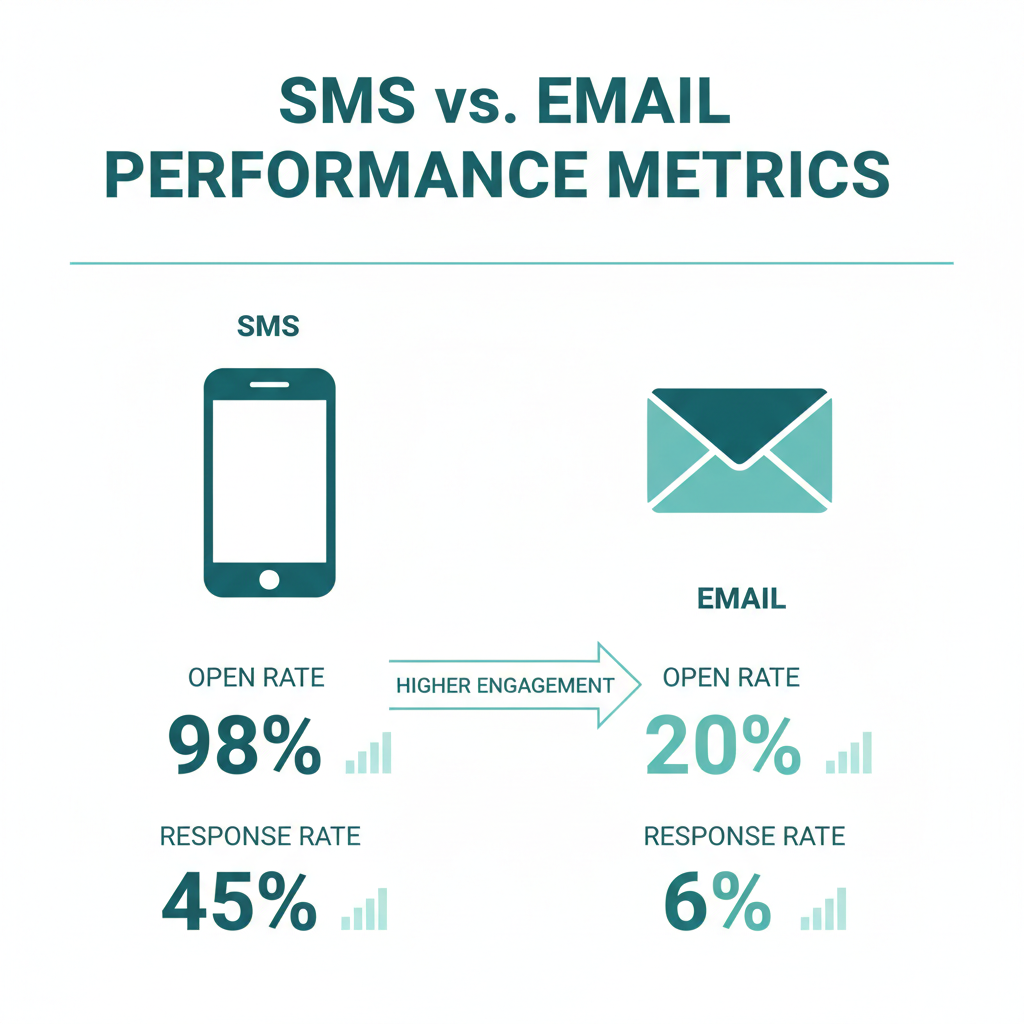
Top Free Tools for Appointment Reminder
Automation If you are operating on a tight budget, you do not need to pay for expensive monthly subscriptions. Several reputable platforms offer free plans with automated communication features.
Square Appointments: A Solo Operator's
Dream For solo, single-location operators, Square Appointments is one of the most robust options available. Square Appointments offers a free plan for solo, single-location operators that includes automated SMS and email reminders [8]. This makes Square Appointments one of the most popular free scheduling tools for solo professionals who want appointment reminder automation without paying a monthly subscription [8]. It handles everything from your booking page to automated text alerts, making it perfect for independent tattoo artists, hair stylists, or massage therapists.
Google Calendar: Free but Limited Google
Calendar is a staple for solo business owners, but it has some limitations when it comes to automated texting. Google Calendar's native Appointment Schedules feature supports up to five automated email reminders on eligible plans, but does not natively support SMS reminders [6]. While Google Calendar is a popular free tool for solo operators, businesses wanting to send text reminders must integrate a third-party add-on or service [6]. Fortunately, you can bridge this gap using third-party Google Calendar add-ons like Remindlo. Remindlo offers a free-forever tier that includes 10 free SMS reminders per month [7], [14]. This option allows micro-businesses with very low booking volumes to send automated texts directly from their existing calendar without any software costs [7].
Setmore: Great for Email, Paid for
SMS Setmore is another widely used scheduling platform with a generous free tier. Setmore's free tier provides automated, customizable email reminders but reserves SMS reminders for its paid subscription tiers [10]. Solo operators using Setmore can automate their client communication for free, but they must rely on email unless they upgrade their plan [10].
WhatsApp Business: Excellent for Chat,
Lacks Scheduling Many small business owners try to leverage WhatsApp for client communications. While the free WhatsApp Business app includes automated Greeting and Away messages, it lacks a native scheduler to send proactive appointment reminders at a future date and time [11], [12]. To send automated reminders via WhatsApp without manual typing, businesses must use third-party browser extensions or pay for the WhatsApp Business API [11], [13]. 
Step-by-Step Guide to Setting Up Free
Reminders Setting up your automated system does not have to be complicated. Here is how you can configure two of the most popular free setups.
Setting Up Square Appointments * Step 1:
Sign up for a free solo account on the Square platform and navigate to the Appointments tab.
- Step 2: Set up your business profile, list your services, and customize your online booking page.
- Step 3: Go to the Settings menu, select Communications, and locate the reminders section.
- Step 4: Enable both automated email and SMS reminders, and customize the timing to fit your client workflow.
Setting Up Google Calendar with Remindlo * Step 1:
Open Google Calendar and install the Remindlo add-on from the Google Workspace Marketplace [14].
- Step 2: Create a free account with Remindlo to activate your 10 free SMS reminders per month [7].
- Step 3: Link your Google Calendar to the Remindlo dashboard.
- Step 4: Set up your reminder template so that whenever you add an event with a client's phone number, an automated text is scheduled automatically [7].
Scaling Your Client Communication with
Conversify While free tools are fantastic for starting out, they often come with caps and limitations. For instance, sending only 10 text reminders a month will not sustain a growing business, and relying purely on email means dealing with lower open rates. When your business begins to scale, you need a more robust customer communication system. This is where a professional platform like Conversify comes into play. Conversify offers a unified shared inbox, AI-powered auto-responses, and advanced appointment booking tools designed to streamline client communication. Instead of juggling multiple apps, Conversify aggregates your SMS, email, and social media chats into a single interface. When you are ready to upgrade your operations, you can explore our pricing plans to find a solution that matches your growth, or read our About Conversify page to understand our mission. Using an integrated tool allows you to deliver a premium client experience without spending hours typing manual follow-ups. 
Frequently Asked Questions
Is there a completely free way to send text message reminders?
Yes, solo operators can use the free tier of Square Appointments, which includes automated SMS and email reminders at no cost [8]. Alternatively, you can use Google Calendar paired with a free-forever add-on like Remindlo, which provides 10 free SMS reminders per month [7], [14].
Why should I choose SMS over email for client reminders?
SMS reminders achieve a 98 percent open rate and a 45 percent response rate, making them highly effective for securing confirmations [3], [4], [11]. In contrast, emails in service settings only get a 20 percent to 30 percent open rate and a 5 percent to 10 percent response rate [3], [4], [11].
Can I send automated text reminders directly from Google Calendar?
Google Calendar does not natively support SMS reminders, though its native Appointment Schedules feature supports up to five automated email reminders [6]. To send automated text reminders, you must integrate a third-party add-on or service [6].
Does Setmore allow me to send free text reminders?
No, Setmore's free tier only provides automated, customizable email reminders [10]. If you want to send automated SMS reminders through Setmore, you must upgrade to one of their paid subscription tiers [10].
Can I schedule future reminders using the free WhatsApp Business app?
The free WhatsApp Business app includes automated Greeting and Away messages, but it lacks a native scheduler to send proactive reminders at a future date [11], [12]. To automate future WhatsApp reminders, you must use third-party browser extensions or pay for the WhatsApp Business API [11], [13].
How much do missed appointments cost businesses overall?
Across 105 published studies, the average appointment no-show rate is approximately 23 percent, causing significant revenue leakage [1]. On a larger scale, missed appointments cost the United States healthcare system an estimated 150 billion dollars annually [5].
Sources [1] Etisia No-Show Statistics
- Epiphany Dynamics Automated Appointment Reminders Guide
- SMS Reminder App No-Show Statistics
- Proactive Chart Appointment Reminders Comparison
- Curogram Patient No-Show Rate Analysis
- Etisia Google Calendar SMS Reminders Guide
- Remindlo Google Calendar Automation Guide
- Koalendar Square Appointments Pricing Review
- SMS Reminder App Appointment Booking Features
- Setmore Email Reminders Feature Overview
- Blueticks WhatsApp Reminder Messages Tutorial
- DragApp WhatsApp Auto-Reply Guide
- WA Reminders WhatsApp Appointment Booking Page
- Google Workspace Marketplace Free SMS Reminders for Google Calendar Reducing your no-show rate is one of the fastest ways to increase your business's profitability. While solo operators can easily get started with free tools like Square Appointments or Google Calendar integrations, these free options often have limits that can restrict your growth. As your booking volume increases, implementing a centralized communication platform like Conversify will help you manage client relationships, handle incoming inquiries with AI, and keep your calendar completely full. Explore our related articles to discover more strategies for growing your service business.
David Friedman - Founder, Conversify · LinkedIn
David Friedman is a B2B operations leader with over 10 years of experience managing large-scale teams and business processes. After years of working with service businesses and seeing how much time was lost to manual customer communication, he founded Conversify, an AI-powered platform that helps healthcare practices and service providers across Europe automate their patient and client interactions. David built the platform from the ground up, working directly with practicing healthcare professionals to ensure every feature solves a real operational pain point. He is based in Spain.