How to Set Up Automated Patient Reminders That Work
Discover the exact steps and best practices to set up automated patient reminders. Reduce no-shows by up to 60% and save valuable staff hours using HIPAA-compliant SMS strategies.
To set up automated patient reminders, you must integrate your Electronic Health Record (EHR) system with a HIPAA-compliant messaging platform, configure a multi-stage outreach schedule (ideally at 72 hours, 24 hours, and 2 hours), and prioritize SMS text messages. This setup can reduce patient no-show rates by 30% to 50% [3]. Implementing this technology is a major priority for modern clinics. According to the Medical Group Management Association (MGMA), 88% of healthcare leaders report using automated appointment reminders in their organizations [9]. This widespread adoption is driven by the need to reduce staff time spent on manual outreach, minimize scheduling errors, and improve overall communication consistency [9]. By deploying a multi-channel system that uses automated SMS, clinics can save an average of 5 staff hours per week [10] while cutting outreach costs. Automated systems cost just 0.14 Euros per contacted patient compared to 0.90 Euros for manual phone calls [2]. If you are looking to optimize your practice operations, you can read our related articles on clinic management, or check out our pricing plans to find the right tool for your office.
Why should your practice automate patient reminders?
Missed appointments are a silent drain on the healthcare industry. They cost the U.S. healthcare system roughly $150 billion annually, with just two no-shows a day costing an individual practice more than $50,000 in lost revenue over a year [4]. This financial loss is accompanied by disrupted care for patients with chronic conditions and wasted staff time. Implementing automated appointment reminders can reduce patient no-show rates by 30% to 50%, with some comprehensive SMS and email systems achieving reductions of up to 60% [3]. This reduction directly protects practice revenue and ensures that empty appointment slots can be filled by other patients in a timely manner. 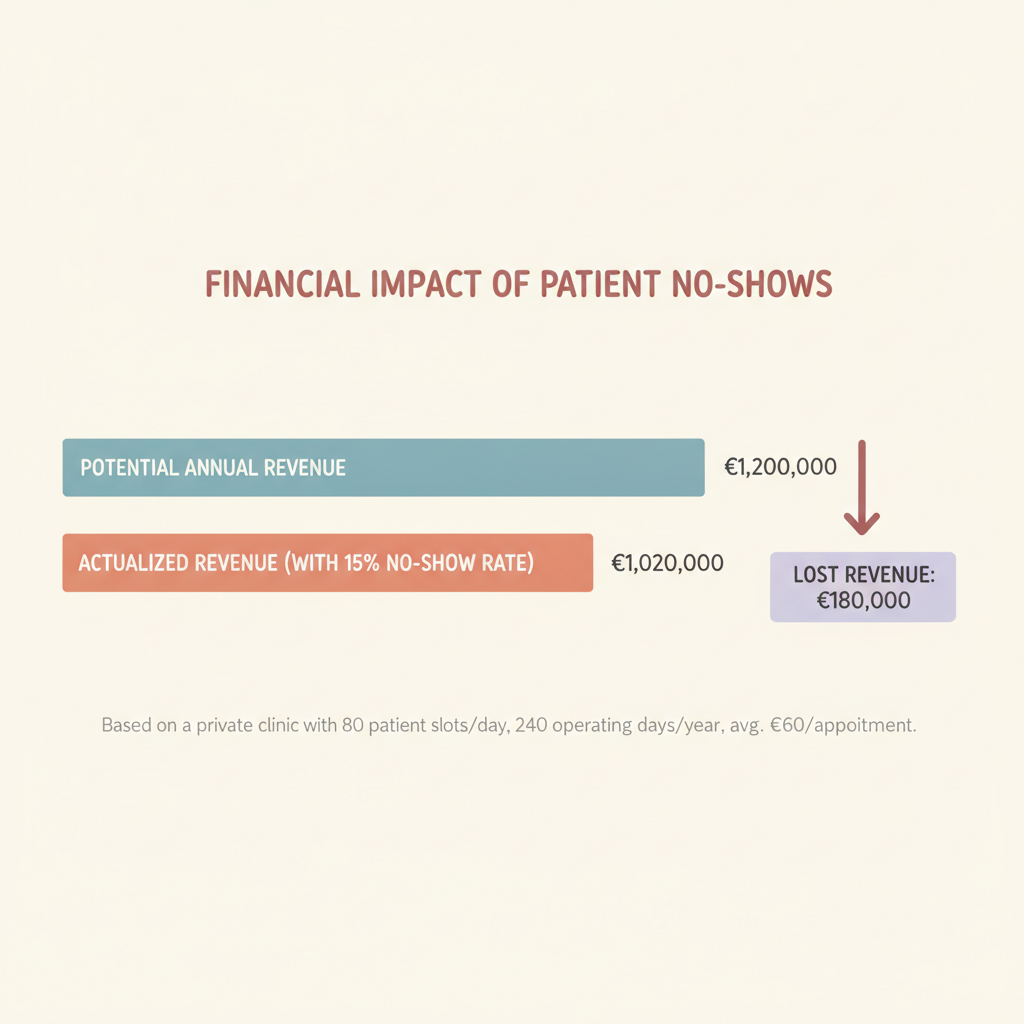
How do you choose the right communication channels?
When figuring out how to set up automated patient reminders, channel selection is critical. While email and phone calls have their place, SMS text messaging is the clear winner for patient engagement. * SMS text messages achieve an open rate of 98%, with 90% read within 3 minutes of delivery, compared to healthcare email open rates of only 12% to 30% [5]. This massive disparity makes text messaging the most effective single channel for urgent healthcare communications and time-sensitive appointment confirmations.
- Approximately 70% to 75% of patients, including 75% of millennials, prefer receiving text messages for appointment reminders and updates over phone calls or emails [1]. Meeting this consumer expectation not only improves attendance rates but also enhances overall patient satisfaction and retention.
- Automated SMS reminders achieve response rates of 97% to 99%, whereas traditional manual phone calls only achieve response rates of 30% to 60% [8]. Because patients can view and reply to texts at their convenience, SMS eliminates the communication barriers of missed calls and unreturned voicemails.
What is the ideal reminder schedule for maximum attendance?
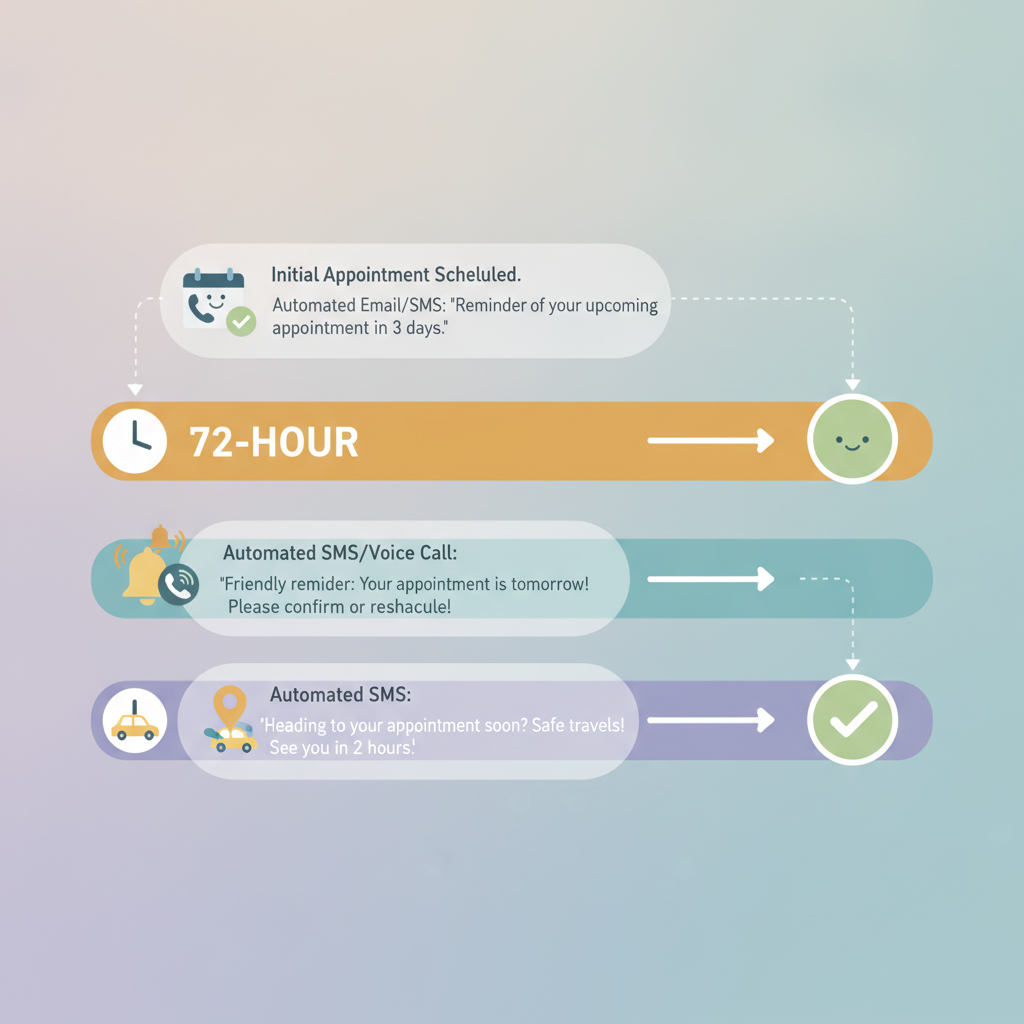
Timing is everything when it comes to patient communication. Sending too many messages can annoy patients, while sending too few leads to forgotten appointments. Sending a sequence of three reminders, one at 72 hours, one at 24 hours, and a final reminder 2 hours before the appointment, consistently delivers the highest attendance rates [7]. This multi-stage cadence keeps the appointment top-of-mind for the patient without overwhelming them with excessive communication. * The 72-Hour Reminder: This initial message gives the patient enough time to reschedule if they have a conflict. It helps you open up the slot for other patients who need care.
- The 24-Hour Reminder: This serves as the primary confirmation message. It secures the patient's commitment to the slot.
- The 2-Hour Reminder: This final nudge acts as a practical reminder, giving the patient time to travel, arrange childcare, or log into their telehealth software.
Step-by-Step: How to set up automated
patient reminders Setting up automated reminders is a straightforward process when you have the right tools. Follow these steps to establish an efficient system in your clinic: * Step 1: Choose a HIPAA-compliant platform. Security is paramount in healthcare. Ensure your selected vendor offers 100% HIPAA-compliant messaging across all digital channels. To avoid manual data entry, your messaging tool must sync with your scheduling software. This integration ensures that when an appointment is booked, the reminder sequence is triggered automatically.
- Step 3: Define your messaging cadence. Set up your automated rules to send messages at the proven intervals of 72 hours, 24 hours, and 2 hours before the scheduled time [7].
- Step 4: Draft clear and concise templates. Keep your texts simple. Include the patient's name, doctor's name, date, time, and a clear call to action (e.g., "Reply YES to confirm or NO to cancel").
- Step 5: Integrate self-scheduling options. Experian Health's State of Patient Access survey found that 89% of patients believe the ability to schedule appointments anytime using digital tools is important [6]. Make sure your reminders include links that allow patients to reschedule or book new visits directly from their phones.
How does automation compare to manual patient outreach?
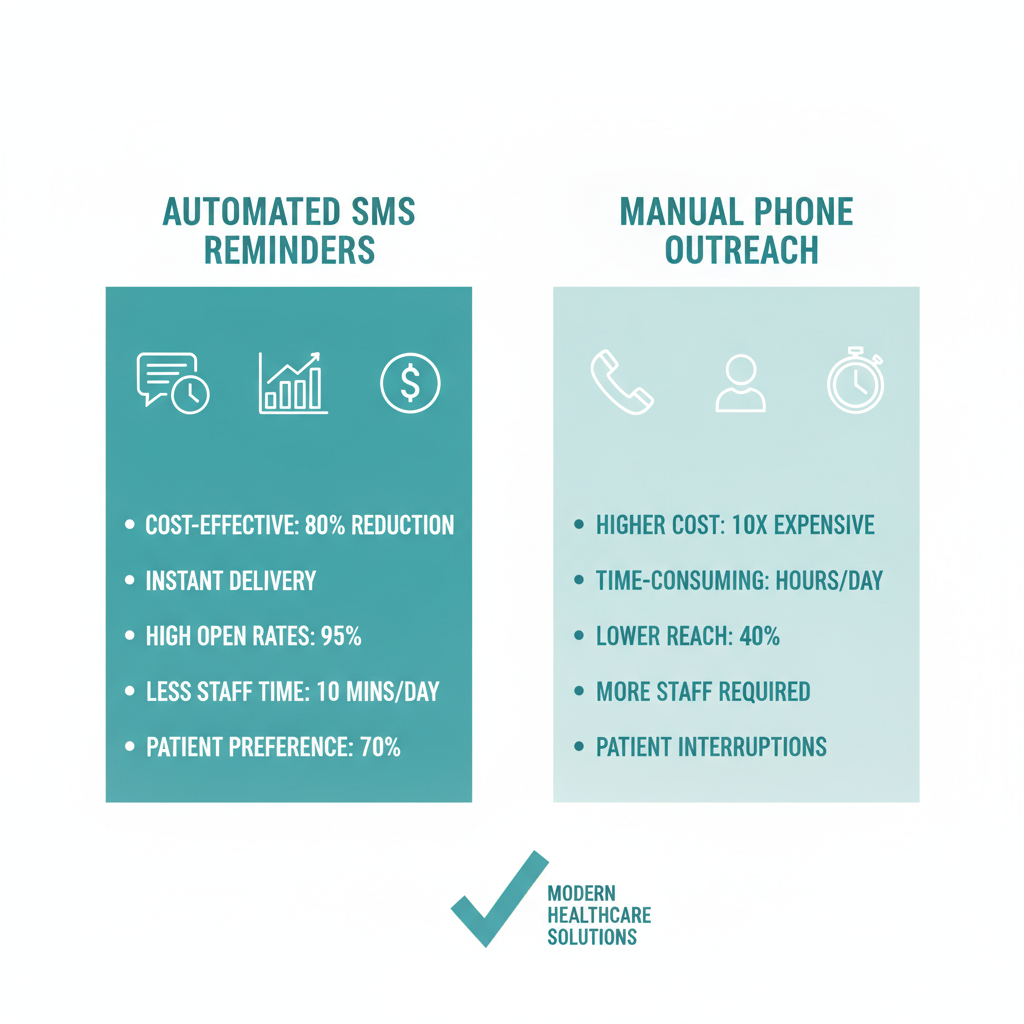
Many clinics still rely on front-desk staff to make phone calls. Let's look at how manual outreach compares to automated systems across key metrics.
| Metric | Manual Phone Reminders | Automated SMS Reminders |
|---|---|---|
| Cost Per Patient | 0.90 Euros [2] | 0.14 Euros [2] |
| Response Rate | 30% to 60% [8] | 97% to 99% [8] |
| Staff Time Required | High (hours of calling) | None (fully automated) |
| Open/Read Rate | Low (voicemails ignored) | 98% (90% read in 3 mins) [5] |
Frequently Asked Questions
How much do missed appointments cost healthcare practices?
Missed appointments cost the U.S. healthcare system roughly $150 billion annually [4]. For an individual private practice, just two no-shows a day can cost more than $50,000 in lost revenue over a year [4]. This makes reducing no-shows a high-priority goal for practice managers.
What is the most effective channel for patient reminders?
SMS text messaging is the most effective channel because it achieves an open rate of 98%, with 90% of messages read within 3 minutes of delivery [5]. In comparison, healthcare email open rates range from only 12% to 30% [5]. Texting removes the barriers of missed phone calls and unreturned voicemails.
What is the best sequence for sending automated reminders?
Research shows that sending a sequence of three reminders consistently delivers the highest attendance rates [7]. The ideal cadence is sending one reminder at 72 hours, another at 24 hours, and a final reminder 2 hours before the scheduled appointment [7].
Do patients actually prefer receiving text reminders?
Yes, approximately 70% to 75% of patients prefer receiving text messages for appointment reminders and updates over phone calls or emails [1]. This preference is shared by 75% of millennials, making SMS the standard for modern patient communication [1].
How much time can clinic staff save with automated reminders?
Healthcare providers using automated texting save an average of 5 staff hours per week [10]. Offloading these manual calling tasks allows front-desk staff to focus on critical in-office activities like patient care and intake [10].
Is it expensive to set up automated patient reminders?
No, automated reminder systems are highly cost-effective, costing an average of 0.14 Euros per contacted patient [2]. This is significantly cheaper than manual telephone reminders, which cost around 0.90 Euros per patient in staff labor and phone expenses [2].
Sources * [1] dialoghealth.com
- [2] simplybook.me
- [3] curogram.com
- [4] proactivechart.com
- [5] falkonsms.com
- [6] resolvepay.com
- [7] offthecusp.com
- [8] medlaunch.health
- [9] mgma.com
- [10] mgma.com Transitioning from manual outreach to an automated system is one of the most impactful decisions a healthcare practice can make.
David Friedman - Founder, Conversify · LinkedIn
David Friedman is a B2B operations leader with over 10 years of experience managing large-scale teams and business processes. After years of working with service businesses and seeing how much time was lost to manual customer communication, he founded Conversify, an AI-powered platform that helps healthcare practices and service providers across Europe automate their patient and client interactions. David built the platform from the ground up, working directly with practicing healthcare professionals to ensure every feature solves a real operational pain point. He is based in Spain.