
How to Run Automated Sales Surveys to Maximize Response Rates
Discover how to set up and run automated sales surveys via SMS and WhatsApp. Transitioning away from manual email surveys can boost your response rates up to 65% while keeping customer experience fresh.
Running automated sales surveys refers to using SMS or WhatsApp triggers to collect real-time customer feedback immediately after a transaction. By integrating tools like Conversify, businesses can automatically trigger conversational micro-surveys that achieve response rates between 45% and 65% [1], far outperforming traditional email surveys that struggle at 8% to 15% [1].
This approach allows local service businesses, such as salons, restaurants, stores, and agencies, to capture client sentiment while the experience is top of mind. Instead of relying on manual follow-ups, automated surveys send short, conversational questions directly to a customer's preferred messaging app.
Because approximately 80% of all transactional survey responses arrive within the first 48 hours of delivery [4], immediate automated triggers are essential for capturing high-quality data. Shifting to mobile-native messaging channels removes the friction of external links, ensuring your team can act on feedback instantly to recover at-risk customers.
At About Conversify, we design intelligent conversational tools that help service businesses bridge the gap between service delivery and customer feedback. By setting up automated, conversational surveys, you can build a more responsive, customer-centric brand.
Why Traditional Email Surveys Fail (And Why Mobile Wins)
For years, businesses relied on email to gather customer feedback. However, email is no longer an effective channel for real-time customer communication. Traditional email surveys suffer from low engagement, with average response rates hovering between a meager 8% and 15% [1].
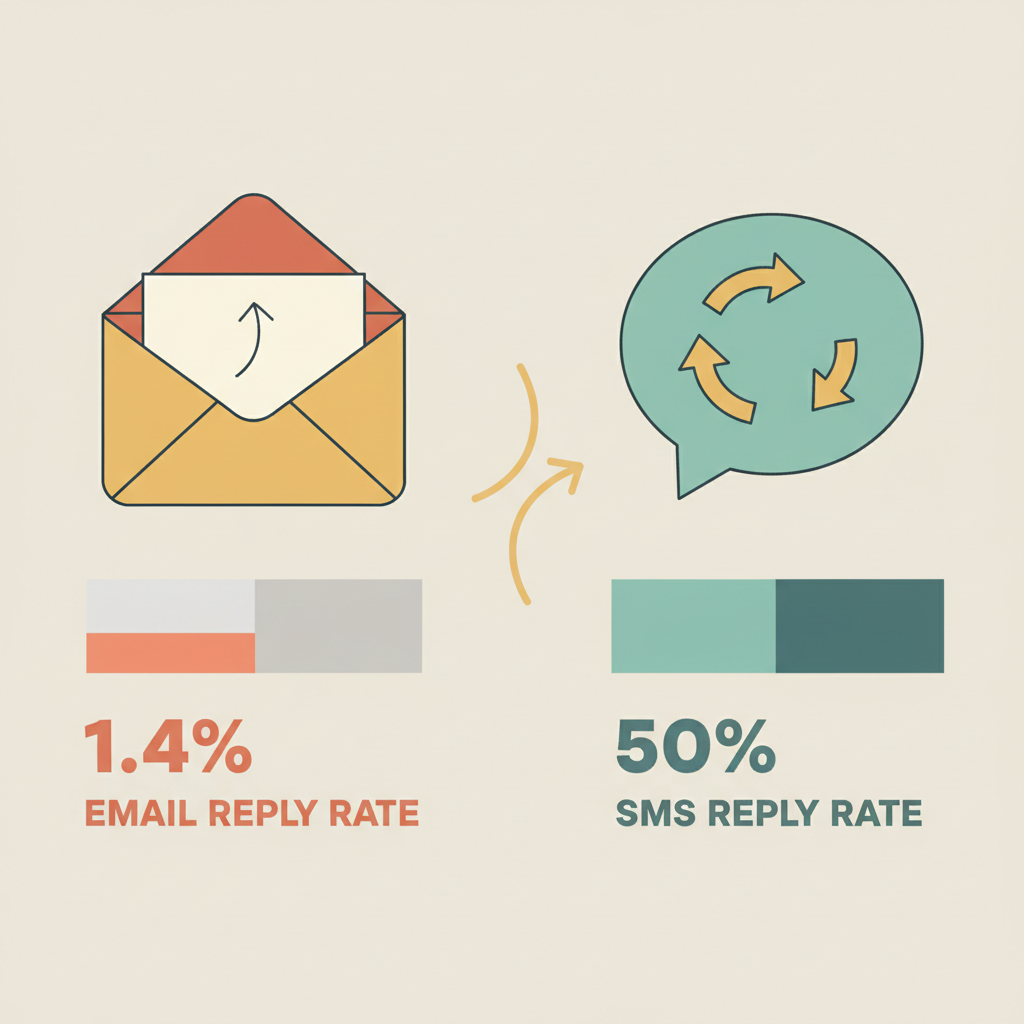
The primary reason for this decline is the lack of conversational engagement. A comprehensive study of over 10 million conversations conducted by Verse demonstrated that SMS reply rates average an impressive 50%, compared to a tiny 1.4% reply rate for email [6]. This massive gap shows that customers are far more responsive to text-based communication than they are to inbox clutter.
When you transition to mobile messaging, the difference in customer participation is stark. Implementing WhatsApp review requests, for example, has been shown to drive an 84% increase in response rates compared to traditional email campaigns [1]. Conversational feedback flows, where each question arrives as an individual message, produce significantly higher completion rates than traditional form-based surveys. Customers prefer the interactive, casual nature of a chat interface over a static web form.
The Science Behind High-Response Conversational Surveys
To understand why mobile surveys perform so exceptionally well, we can look at rigorous academic and market research. A randomized mode experiment conducted in Colombia compared WhatsApp to short message service (SMS) and interactive voice response (IVR) surveys [2]. The study found that WhatsApp yielded a 55% response rate, which was 12 percentage points higher than IVR (at 43%) and 27 percentage points higher than SMS (at 28%) [2].
The researchers attributed WhatsApp's superior performance to two main factors:
- A higher percentage of respondents who actually started the survey (60%) [2].
- An incredibly high rate of those starters completing the entire survey (92%) [2].
This high completion rate is not a fluke. In another study, a panel survey of Venezuelan refugees in Colombia achieved a 75 percent response rate for WhatsApp surveys [5]. This demonstrates the high efficacy of using WhatsApp as a primary data collection channel, even when engaging with highly mobile, hard-to-reach populations [5].
The psychological barrier of completing a survey is much lower on messaging apps. Micro-surveys delivered via chat feel less like a chore and more like a natural, low-pressure conversation [1]. Because of this, completion rates for chat-based surveys frequently exceed 40% [1]. Customers do not need to click an external link, wait for a web page to load, or navigate a complex form; they can simply tap a quick-reply button or type a single number right inside their chat window [1].
Step-by-Step: How to Run Automated Sales Surveys
Implementing an automated feedback loop requires combining the right technology with smart timing. Here is how you can set up a high-performing automated sales survey system for your business.
- Choose Your Channels (SMS and WhatsApp)
- Set Up Real-Time Event Triggers
- Keep Your Surveys Brief and Logic-Driven
- Integrate with Your CRM and Automation Tools
How to Handle Positive and Negative
Survey Feedback Automatically
Gathering survey responses is only the first step; the real value lies in how you respond to that data. Modern businesses use conversational platforms to handle incoming feedback in real-time. By utilizing an AI-powered shared inbox, your team can view, manage, and respond to survey replies from SMS and WhatsApp in one centralized location.
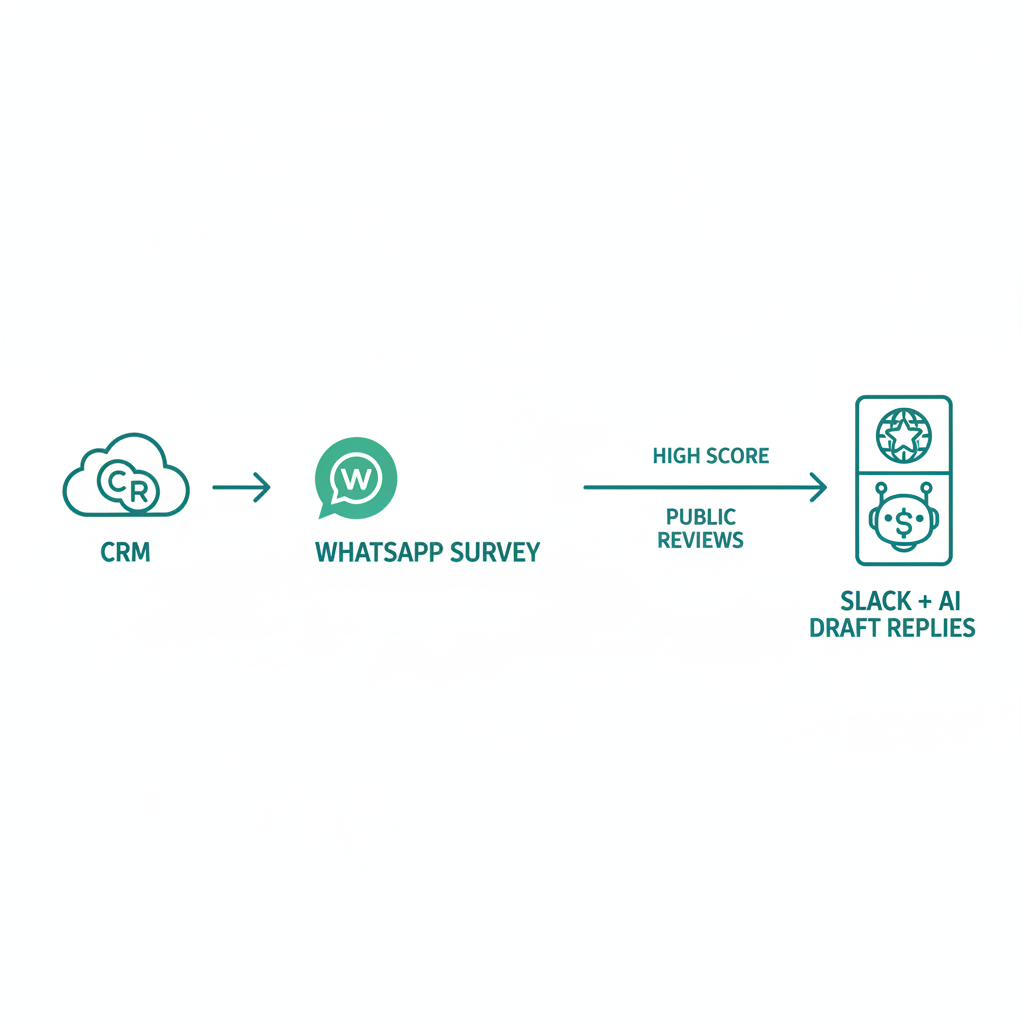
For positive feedback, automation can instantly guide happy customers to make the most of their experience. If a customer responds with a high score, the system can automatically send a follow-up message containing a link to your public review profiles. This conversational approach is why implementing WhatsApp review requests has been shown to drive an 84% increase in response rates compared to email [1].
For negative feedback, speed is critical. Approximately 80% of all transactional survey responses arrive within the first 48 hours of delivery [4]. If a customer expresses dissatisfaction, your automated system must flag the response immediately. Integrating survey platforms with CRMs and automation tools like Make allows businesses to automatically route negative feedback (ratings of six or below) to dedicated Slack channels and use AI to draft personalized outreach messages [8]. Your support team can then review the AI-drafted message, make any necessary adjustments, and send a personalized response within minutes, turning a negative experience into a customer retention win.
To explore how you can implement these automated messaging workflows, check out our pricing plans or read our related articles on conversational customer support.

Frequently Asked Questions
Why are WhatsApp survey response rates so much higher than email?
WhatsApp surveys achieve response rates of 45% to 65% compared to just 8% to 15% for traditional email surveys [1]. This is because WhatsApp surveys are delivered as micro-surveys directly inside a chat window, allowing customers to reply with a single tap or number instead of opening external links and loading complex web forms [1].
When is the best time to send an automated sales survey?
You should trigger automated surveys within 24 hours of job completion [3]. This is crucial because approximately 80% of all transactional survey responses arrive within the first 48 hours of delivery, meaning you must capture client sentiment while the experience is fresh [4].
How many questions should be included in a text-based survey?
SMS and WhatsApp surveys should be brief, with a recommended maximum of 12 questions to increase the likelihood of completion [7]. Using skip or branching logic is also recommended so that customers only answer questions relevant to their specific experience [7].
What is the average response rate for SMS surveys?
SMS surveys boast an average response rate of 15% to 30%, supported by an incredible 98% open rate where 90% of messages are read within three minutes of receipt [6]. This high level of immediacy makes SMS highly effective for capturing quick, real-time feedback [6].
How can AI help manage negative survey responses?
By integrating survey platforms with CRMs and tools like Make, businesses can automatically route negative feedback (ratings of six or below) to dedicated Slack channels and use AI to draft personalized outreach messages [8]. This allows customer care teams to instantly address detractors and recover at-risk customers without manual bottlenecks [8].
Why does automating survey requests increase response rates?
Automated surveys triggered instantly by events lead to 3x higher response rates than manual requests [9]. Automation removes the friction, inconsistency, and guesswork of relying on staff to remember to send feedback requests, ensuring every customer is asked for feedback immediately after their interaction [9].
Sources
- [1] Conversify Feedback Automation Guide
- [2] OSF WhatsApp Survey Mode Experiment Study
- [3] Netigate Automated Surveys Best Practices
- [4] FeedbackRobot Transactional Survey Timeline Analysis
- [5] Immigration Policy Lab WhatsApp Refugee Panel Survey
- [6] WASenderAPI WhatsApp Customer Feedback Automation
- [7] Impaxio Optimal Survey Response Rates Report
- [8] Make.com Customer Feedback AI Automation Guide
- [9] GetBeamer How to Automate Customer Feedback
David Friedman - Founder, Conversify · LinkedIn
David Friedman is a B2B operations leader with over 10 years of experience managing large-scale teams and business processes. After years of working with service businesses and seeing how much time was lost to manual customer communication, he founded Conversify, an AI-powered platform that helps healthcare practices and service providers across Europe automate their patient and client interactions. David built the platform from the ground up, working directly with practicing healthcare professionals to ensure every feature solves a real operational pain point. He is based in Spain.