How to Integrate Google Review Automation Tools with a Custom EHR
Discover how to integrate google review automation tools with your custom EHR system. Learn how to stay HIPAA-compliant, avoid common integration pitfalls, and save thousands in operational costs.
Integrating google review automation tools with a custom Electronic Health Record (EHR) system is achieved by using HIPAA-compliant middleware or secure RESTful APIs to trigger automated review requests immediately following appointment-completion events. This setup eliminates manual list uploads and ensures compliance by securing a Business Associate Agreement (BAA) with all data-handling vendors. Clinics must avoid manual processes, which are highly inefficient. In fact, a study published in the Journal of Evaluation in Clinical Practice found that 86.9 percent of surveyed clinicians identified excessive data entry as their primary EHR concern [1]. Manual data entry is also incredibly costly, with annual costs across United States healthcare exceeding 4.6 billion dollars due to redundant keying, error correction, and rework [1]. Furthermore, healthcare practices that rely on manual processes to ask for patient reviews experience an 80 percent drop in review request volume within 90 days [3]. To solve this, clinics can establish automated triggers using Fast Healthcare Interoperability Resources (FHIR) APIs [11] or HIPAA-compliant middleware like Zenphi [6] or Keragon [7]. This architecture securely transmits simple appointment-completion data to google review automation tools, ensuring a steady stream of reviews without burdening front desk staff.
Why Manual Google Review Requests Fail
Healthcare Clinics Many clinics start with the best intentions, asking front desk staff to manually solicit reviews or upload patient spreadsheets to review platforms at the end of each week. However, this manual approach is highly prone to failure. Front desk staff are constantly balancing competing tasks, such as answering phone calls, checking in patients, and handling billing. Because of these immediate demands, manual review collection efforts are often forgotten, resulting in an 80 percent drop in review request volume within just 90 days [3]. Beyond human forgetfulness, manual data entry represents a massive operational drain. The excessive administrative burden of manual data entry is the primary concern for 86.9 percent of clinicians [1]. This administrative friction costs the United States healthcare sector over 4.6 billion dollars annually due to redundant keying, error correction, and rework [1]. When clinic staff spend hours copy-pasting patient contact details from an EHR into a review tool, they are wasting precious time that could be spent on patient care. Automating this pipeline directly addresses these inefficiencies. By linking your internal EHR directly to your review systems, you ensure that every eligible patient receives a request, without requiring a single keystroke from your staff. Modern communication platforms can help bridge this gap. For instance, clinics looking to streamline patient interactions can explore Conversify's versatile messaging solutions and review our competitive pricing plans. To understand how we support healthcare practices with automated communication, you can read more About Conversify and our mission to simplify patient touchpoints. 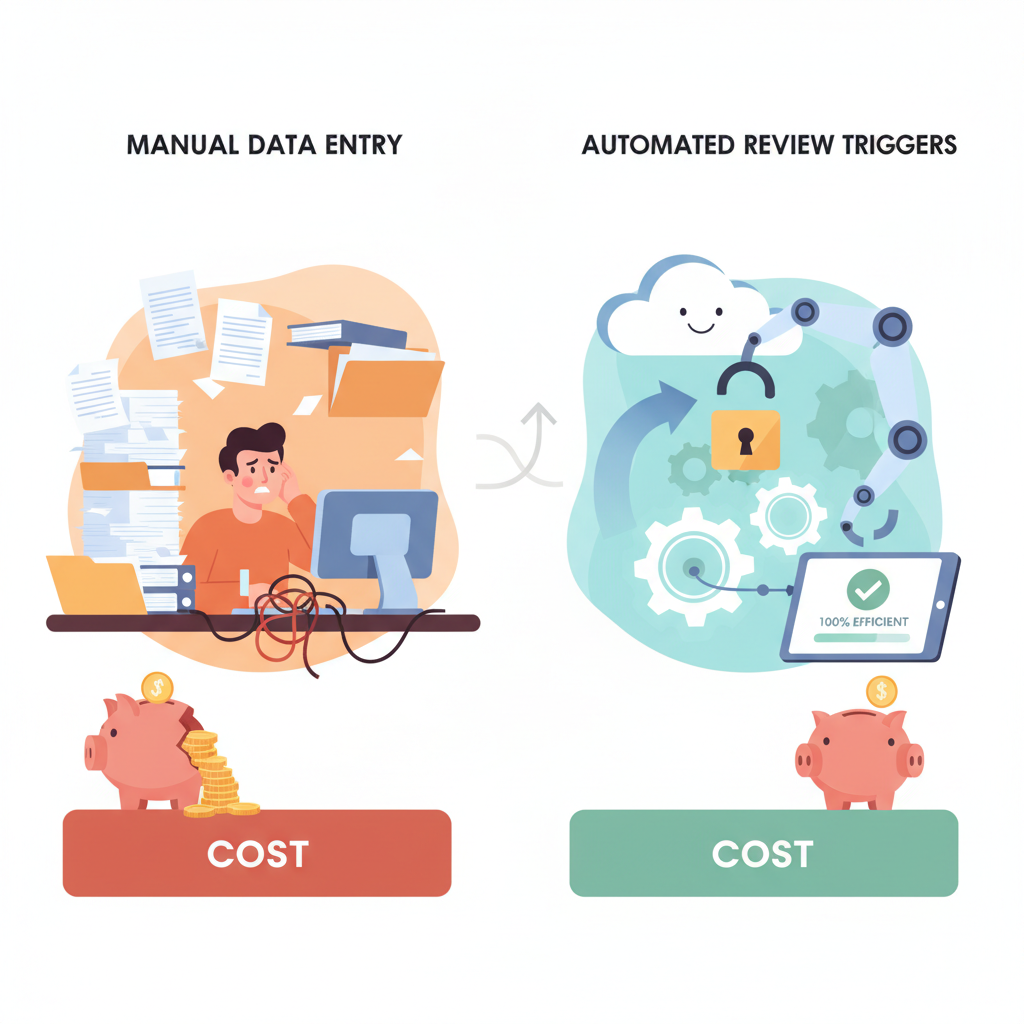
The HIPAA Compliance Trap: Why Zapier
and Make Won't Work When clinic owners decide to automate their reviews, their first instinct is often to connect their custom EHR to a review tool using popular automation platforms like Zapier or Make. However, in a healthcare environment, this path introduces severe legal and security risks. Under HIPAA regulations, if a review management software accesses patient records to trigger requests, the vendor is legally considered a Business Associate [4]. As a result, the vendor must sign a Business Associate Agreement (BAA) to ensure Protected Health Information (PHI) is handled securely [4]. Using them to pass patient names, phone numbers, or email addresses to an external tool is a direct compliance violation. Security in healthcare integrations cannot be overlooked. Approximately 58 percent of healthcare data breaches involve third-party vendors, highlighting the critical risk of insecure data pipeline management [13]. To build a secure and compliant integration, clinics must use dedicated, healthcare-specific middleware platforms like Zenphi or Keragon [6, 7]. Zenphi, for example, allows clinics to securely connect to any EHR with an API (including major systems like Epic, Athenahealth, Kareo, or Cerner) while offering a BAA on all paid plans [6]. This ensures that your patient data remains fully protected as it moves from your custom EHR to your google review automation tools.
Step-by-Step Guide: How to Safely Build
Your EHR Integration Building a custom integration requires a structured approach to ensure both technical stability and legal compliance. Here is how your development team can safely connect your custom EHR to a review automation system: Establish an Appointment-Completion Trigger: To maintain strict HIPAA compliance, review requests should be triggered solely by appointment completion events, such as a webhook firing when a visit is marked complete in your EHR [4]. Do not use clinical records, treatment details, or diagnosis data to segment your lists [4]. Utilizing clinical data to target review requests qualifies as a use of PHI and requires explicit, prior patient consent, whereas simple appointment-completion triggers minimize compliance risks [4]. Leverage FHIR APIs for Secure Data Exchange: If you are building or upgrading a custom EHR system, your developers should leverage Fast Healthcare Interoperability Resources (FHIR) [11]. FHIR is the modern HL7 standard that uses RESTful APIs and modular data containers to enable structured, validated, and secure data exchange between healthcare systems while maintaining a compliant audit trail [11]. Route Data Through HIPAA-Compliant Middleware: Connect your EHR's webhook to a compliant middleware platform like Zenphi or Keragon [6, 7]. The middleware acts as a secure bridge, receiving the appointment-completed signal and passing only the necessary contact details (name and phone number or email) to your review tool under the protection of a signed BAA [6]. Implement a Smart Delay: Do not send the review request the second the patient walks out the door. Modern review automation workflows typically implement a smart delay of 1 to 3 hours, or up to 24 to 48 hours, after appointment completion before sending the request [9]. This delay ensures the patient has left the clinic and had time to process their experience, which maximizes the likelihood of receiving a positive response [9]. * Route to Location-Specific Google Profiles: If your clinic has multiple branches, configure your automation to route patients directly to the specific Google Business Profile of the office they attended [2]. Automated review systems like Curogram have demonstrated the power of this workflow, with one multi-location group collecting 1,064 new 5-star reviews in just three months using automated, location-specific routing [2]. 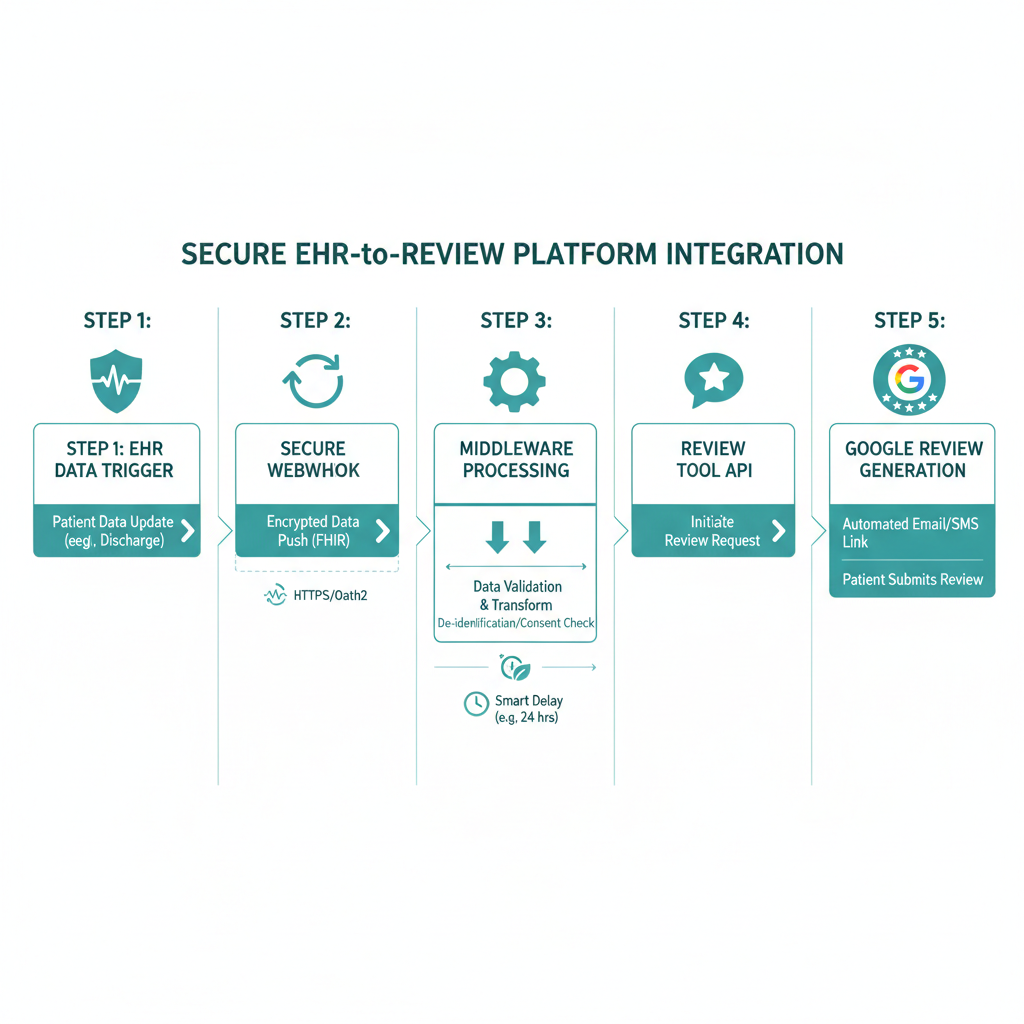
Maximizing the Value of Google Reviews
for Healthcare Practices Automating the collection of Google reviews is only half the battle. Once the reviews start coming in, your clinic must have a clear strategy for managing them. Research from Harvard Business School indicates that businesses that actively respond to reviews earn 35 percent more revenue than those that do not [9]. This highlights the importance of closing the feedback loop. While automation tools handle the initial outreach, your clinical or administrative staff should establish a clear workflow to monitor and respond to the feedback received. This is where a unified communication system becomes invaluable. By combining your review collection with a unified communication suite, you can manage patient replies, text messages, and direct inquiries from a single dashboard. If you want to learn more about optimizing your clinic's patient outreach and digital presence, feel free to read our other related articles on healthcare communication strategies.
Frequently Asked Questions
Why can't I use Zapier or Make to automate patient review requests?
Zapier and Make are not HIPAA-compliant because they do not sign Business Associate Agreements (BAAs) for handling Protected Health Information (PHI) on their standard plans [12]. Passing patient contact details through these platforms to trigger reviews constitutes a compliance violation [12].
What is the safest trigger event for a HIPAA-compliant review request?
The safest trigger is a simple appointment-completion event, such as a webhook firing when a patient is checked out [4]. You must avoid using clinical data, treatment histories, or diagnosis codes to trigger requests, as using clinical data requires explicit patient consent under HIPAA [4].
How much does manual data entry cost the healthcare industry?
Manual data entry costs the United States healthcare system over 4.6 billion dollars annually [1]. This high cost is driven by redundant keying, manual error correction, and administrative rework [1].
What is FHIR and why does it matter for EHR integrations?
FHIR (Fast Healthcare Interoperability Resources) is the modern HL7 standard that uses RESTful APIs and modular data containers [11]. It allows clinics to build structured, validated, and highly secure data pipelines between custom EHRs and external tools [11].
What is the optimal delay for sending a review request?
Modern workflows suggest implementing a smart delay of 1 to 3 hours, or up to 24 to 48 hours, after the appointment is marked complete [9]. This gives the patient time to leave the clinic and reflect on their experience, increasing the likelihood of a positive response [9].
How do Google reviews impact a clinic's financial performance?
According to research from Harvard Business School, businesses that actively respond to their customer reviews earn 35 percent more revenue than those that ignore them [9]. Automation helps secure these reviews consistently, while active staff responses drive financial growth [9].
Sources
- [1] [Nirmitee.io: EHR Data
- [2] Curogram: Automating Review Requests Across AdvancedMD Locations
- [3] Intellivizz.ai: Google Reviews for Doctors Automation
- [4] Flento.io: HIPAA Compliant Review Management in Healthcare
- [6] Zenphi: Healthcare Workflow Automation Solutions
- [7] Keragon: Practice EHR and Google Calendar Integration
- [9] Get Review Engine: Automated Google Reviews
- [10] Wiser Review: How to Automate Google Reviews
- [11] Topflight Apps: AI HL7 FHIR Integration Guide
- [12] Accountable HQ: HIPAA Compliant Workflow Automation
- [13] Cyber Sierra: HIPAA Compliance Platform and Third Party Risk
- [14] ComplyJet: HIPAA Compliance Software and Automation Tools
David Friedman - Founder, Conversify · LinkedIn
David Friedman is a B2B operations leader with over 10 years of experience managing large-scale teams and business processes. After years of working with service businesses and seeing how much time was lost to manual customer communication, he founded Conversify, an AI-powered platform that helps healthcare practices and service providers across Europe automate their patient and client interactions. David built the platform from the ground up, working directly with practicing healthcare professionals to ensure every feature solves a real operational pain point. He is based in Spain.