
Set Up Instagram DM Automation for Businesses to Book Calls
Discover how to connect your booking calendar to Instagram DM automation. Learn the exact steps, platform rules, and tools like Conversify to turn social engagement into booked appointments on autopilot.
Instagram DM automation for businesses is a system that automatically sends messages, like scheduling links, to users who engage with your profile. This automated approach allows service businesses, such as salons, consulting firms, and agencies, to instantly capture lead interest from comments, story replies, or direct messages. Instead of waiting hours for a manual reply, prospects receive an immediate response with a direct link to your booking calendar. Connecting scheduling platforms like Calendly or Acuity to your automated messaging flows ensures your sales pipeline runs on autopilot around the clock. By streamlining this initial touchpoint, you can book 3 to 5 times more discovery calls than with manual inbox management [3], preventing hot leads from cooling off or booking with competitors. Check our related articles for more customer communication strategies.
Why Should Your Business Automate Instagram Bookings?
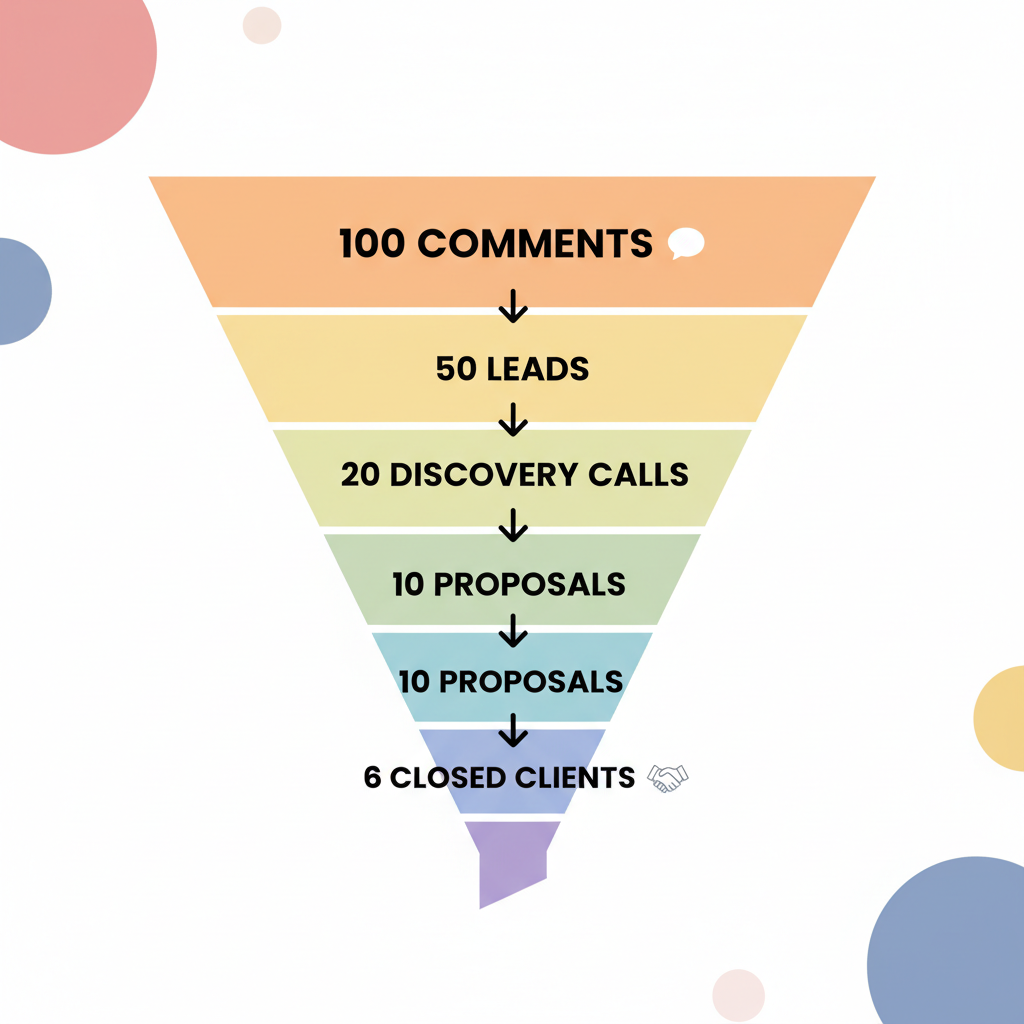
Managing a growing business means balancing customer inquiries with actual service delivery. When prospects reach out on social media, they expect immediate gratification. In fact, automated DM tools deliver booking links in about 8 seconds, whereas manual replies typically take 2 to 6 hours [2]. This rapid response prevents leads from cooling off or booking with a competitor during the hours-long delay of manual inbox management [2]. If you rely on manual replies, you are likely losing a massive portion of your audience. An analysis of 828,000 AI conversations revealed that 53 percent of Instagram DM conversations die before the third message [4]. This high drop-off rate highlights the importance of choosing a highly responsive, conversational tool that can qualify leads and deliver booking links quickly [4]. When you automate this process, the results are highly predictable. At typical conversion rates, 100 interested comments on an Instagram post translate to roughly 50 calendar clicks, 20 booked calls, and 6 closed clients [4]. This funnel demonstrates how a simple comment-to-DM trigger can reliably feed a service business's sales pipeline on autopilot [4]. Compare this to the standard "link-in-bio" strategy, which yields a mere 1 percent click-through rate [1], and the choice becomes obvious. Instagram DM automation for businesses is no longer a luxury; it is an essential pipeline driver.
What Are the Rules for Instagram DM Automation?
Before jumping into setup, it is vital to understand the platform rules established by Meta. To protect users from spam, Instagram enforces strict guidelines on how automated messages can be sent. Failing to follow these rules can result in account restrictions or permanent bans. First, Instagram DM automation is only supported on professional Instagram accounts [8]. This prerequisite requires users to switch to either a Business or Creator profile and link it to a Facebook Page [8]. Doing so ensures that the account has access to Meta's advanced messaging permissions and the official API required for third-party integrations [8]. Second, under Instagram's API rules, automated DMs can only be sent after a user initiates an interaction, such as a comment, story reply, or direct message [9]. This interaction must occur within a strict 24-hour window [9]. Because businesses cannot automatically send unsolicited mass DMs to new followers, they must rely on keyword triggers to legally initiate automated booking flows [9]. Finally, safety is paramount. Safe, Meta-approved Instagram DM automation tools operate through the official Instagram Graph API and typically pace automated messages at up to 200 DMs per hour to prevent account bans [7]. Using official Meta Business Partners ensures compliance with platform rules, unlike unauthorized scraping bots that put your account at risk [7].
Step-by-Step Guide: How to Connect Your
Calendar to Instagram DMs Setting up an automated booking funnel does not require advanced coding skills. By following these steps, you can create a seamless flow that connects your Instagram content directly to your calendar. * Switch to a Professional Account: Go to your Instagram settings, select Account Type, and switch to either a Business or Creator profile [8]. Link this profile to your business's Facebook Page to unlock the necessary API permissions [8].
- Select a Meta-Approved Automation Tool: Choose an official partner that integrates with the Instagram Graph API [7]. Entry-level pricing for popular Meta-approved DM automation tools in 2026 ranges from approximately 9.99 dollars per month for InstantDM to 14 to 17 dollars per month for ManyChat's basic plans [3]. Ensure all messaging permissions are granted.
- Integrate Your Booking Calendar: Paste your scheduling link (from Calendly, Acuity, or your Conversify booking tool) into the message builder. Make sure the link is easily clickable.
- Create Your Keyword Trigger: Set up a trigger based on user behavior. For example, configure the system to send a DM whenever someone comments the word "BOOK" on a specific post or Reel.
- Build the Conversation Flow: Design a friendly, conversational message that delivers the link. Keep it brief to prevent drop-offs.
How to Reduce No-Shows and Maximize
Conversions Getting a prospect to book a call is only half the battle. If they do not show up, your automated funnel is not delivering its full value. Fortunately, automation can also solve the no-show problem. Combining automated DM booking with pre-call email sequences and confirmation DMs can reduce appointment no-show rates from 30 to 40 percent down to 10 to 15 percent [5]. Automating the post-booking follow-up ensures that clients remain engaged and actually show up for their scheduled consultations [5]. Additionally, not every lead who clicks your booking link will complete the scheduling process. Distractions happen. Implementing automated follow-up sequences at intervals like 4 and 24 hours can add 40 percent to 60 percent more bookings from leads who did not schedule on the first interaction [6]. These automated follow-ups capture prospects who got distracted during the initial booking flow without requiring manual tracking by the business owner [6]. 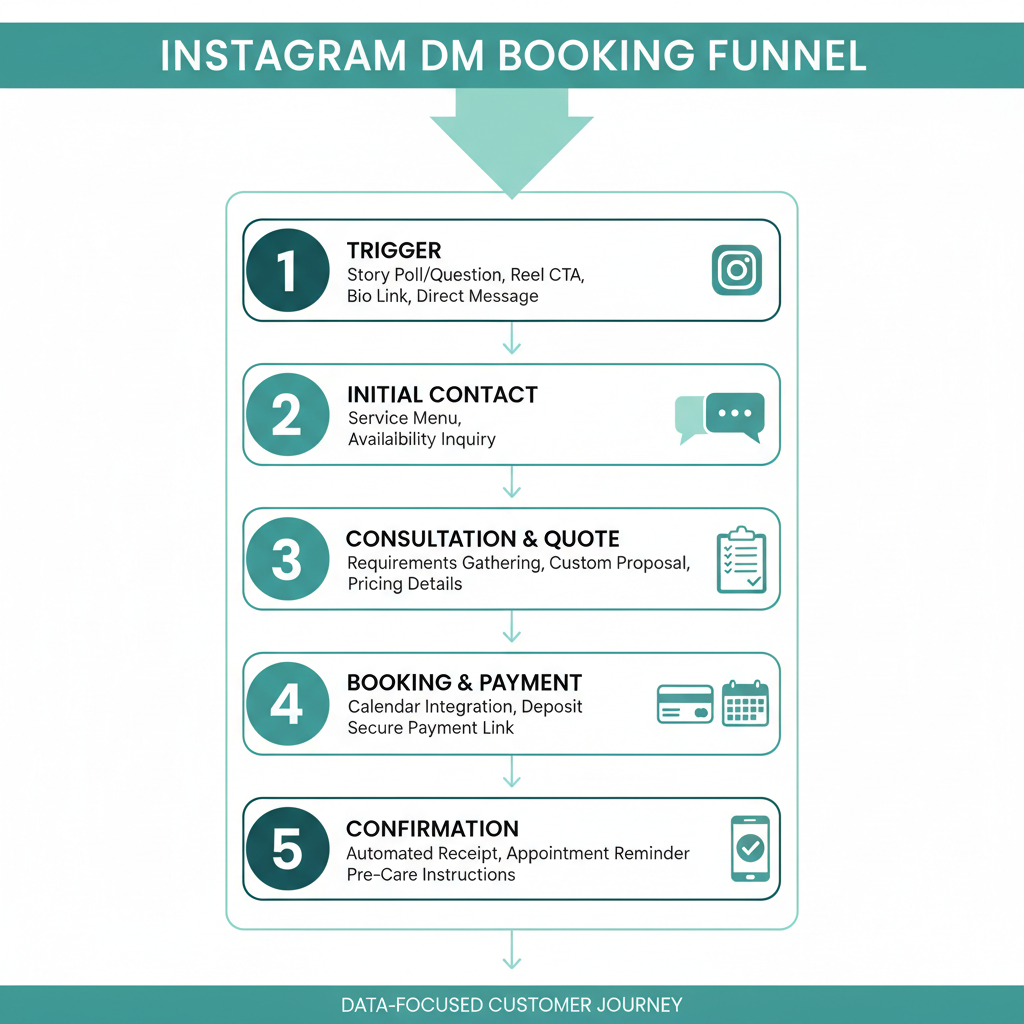
Choosing the Right Automation Tool for
Your Business When selecting a tool, you must weigh your business's specific needs against your budget. Basic tools like ManyChat [1] or LinkDM [7] are excellent for simple keyword-to-link triggers. They are highly affordable, with basic plans starting around 14 to 17 dollars per month [3]. 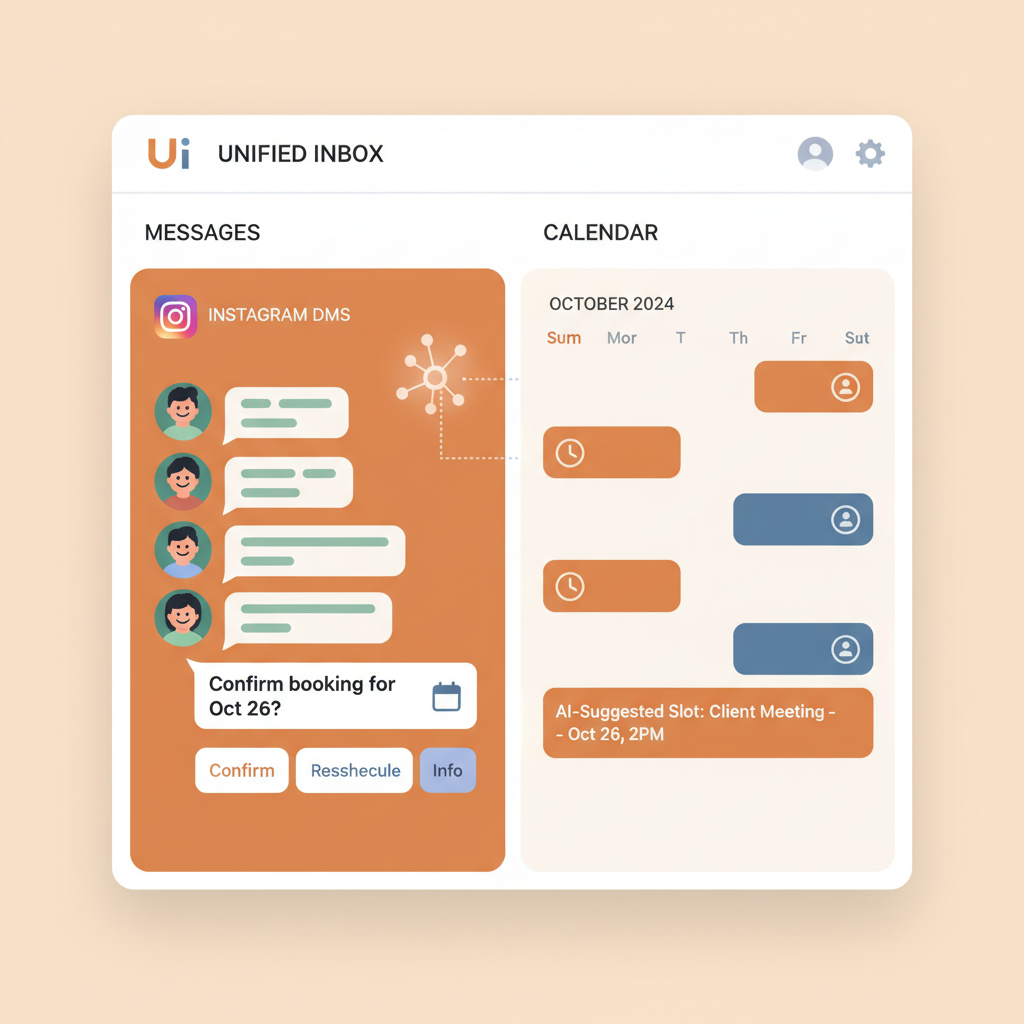
Frequently Asked Questions
Can I use Instagram DM automation on a personal account?
No, Instagram DM automation is only supported on professional Instagram accounts [8]. You must switch your profile to either a Business or Creator account and link it directly to a Facebook Page to access the official messaging API [8].
Will Instagram ban my account for automating DMs?
Not if you use safe, Meta-approved tools that operate through the official Instagram Graph API [7]. These platforms typically pace automated messages at up to 200 DMs per hour to comply with platform limits and prevent account bans [7]. Avoid unauthorized scraping bots.
How fast do automated DMs reply to users?
Automated DM tools deliver booking links in about 8 seconds [2]. This is a massive improvement over manual replies, which typically take 2 to 6 hours, helping you capture hot leads before they cool off [2].
Can automated DMs really increase my bookings?
Yes, using automated DM responses to deliver calendar links can book 3 to 5 times more discovery calls compared to manual replies [3]. This is because automation captures user interest instantly when they comment on a post or Reel [3].
What happens if a lead gets distracted during the booking flow?
You can implement automated follow-up sequences at intervals like 4 and 24 hours [6]. This strategy can add 40 percent to 60 percent more bookings from leads who did not schedule on their first interaction [6].
What is the click-through rate for automated DMs?
The click-through rate for links sent via Instagram DM automation is approximately 46 percent [1]. In comparison, standard link-in-bio links average a click-through rate of just 1 percent [1].
Sources [1] [Brittany Miller Socials:
Why I Use ManyChat for Instagram DM Automation](https://www.brittanymillersocials.ca/post/why-i-use-manychat-for-instagram-dm-automation)
- CreatorFlow: Instagram DM Automation for Coaches and Consultants
- SetSmart: Instagram Automation Tools
- CreatorFlow: Instagram DM Automation Complete Guide
- Vista Social: Instagram DM Automation Guide
- Flowgent: Instagram DM Automation Insights
- LinkToDM: How to Set Up Auto DM on Instagram
- Blotato: Instagram Automation Tools
- ManyChat: Instagram Automation for Influencers
David Friedman - Founder, Conversify · LinkedIn
David Friedman is a B2B operations leader with over 10 years of experience managing large-scale teams and business processes. After years of working with service businesses and seeing how much time was lost to manual customer communication, he founded Conversify, an AI-powered platform that helps healthcare practices and service providers across Europe automate their patient and client interactions. David built the platform from the ground up, working directly with practicing healthcare professionals to ensure every feature solves a real operational pain point. He is based in Spain.